Zedmos

SASE & secure connectivity

Every site and every remote user on one policy

An overlay built on WireGuard and orchestrated from the console, in the shape the estate needs — one hub, a hub pair, direct tunnels between the sites that need them, or full mesh. Spokes dial out, hubs inspect, and access belongs to a person and an application rather than to the address the packet happens to carry.

SASE overlay · one policy at the hubstand-by · host routes onlySitesHead office10.0.1.0/24Branch10.0.2.0/24Warehouse10.0.3.0/24Remote workerper-device keyPrimary hubterminates · inspects · forwardsBackup hubstand-bytakes the spokes over when the primary stops answeringIdentity · Active Directory · Azure AD · SCIMEvery session meetsApplication controlIDS / IPSTLS inspectionAI security & DLPInternet & SaaSone policy for all of ittunnel upstand-byEncrypted overlay · WireGuard, OpenVPN or GRE
Site 1Site 2Site 3Site 4Hub

Hub and spoke

Everything reaches one place. Start here unless you have a reason not to.

Traffic between two sites takes the long way round — and is inspected on the way.

BackupSite 1Site 2Site 3Site 4Hub

Dual hub

An outage at the hub site must not take the other sites with it.

A second listening hub to run. It holds host routes only until it is needed.

Site 1Site 2Site 3Site 4Hub

Spoke shortcut

Two sites talk to each other enough that the detour costs real time.

That pair's traffic stops passing the hub, so it stops being inspected there.

Site 1Site 2Site 3Site 4Hub

Full mesh

Every pair talks to every other. Capped at eight sites.

Every site carries a peer for every other, and one node still brokers the pairs.

Established tunnelDirect path between two sitesStandby path — host routes only until failover

Building the network is drawing it

Place the sites and connect them. The console writes the configuration for both ends of every tunnel and pushes it — nobody opens a firewall and types a rule. Minutes, not an afternoon.

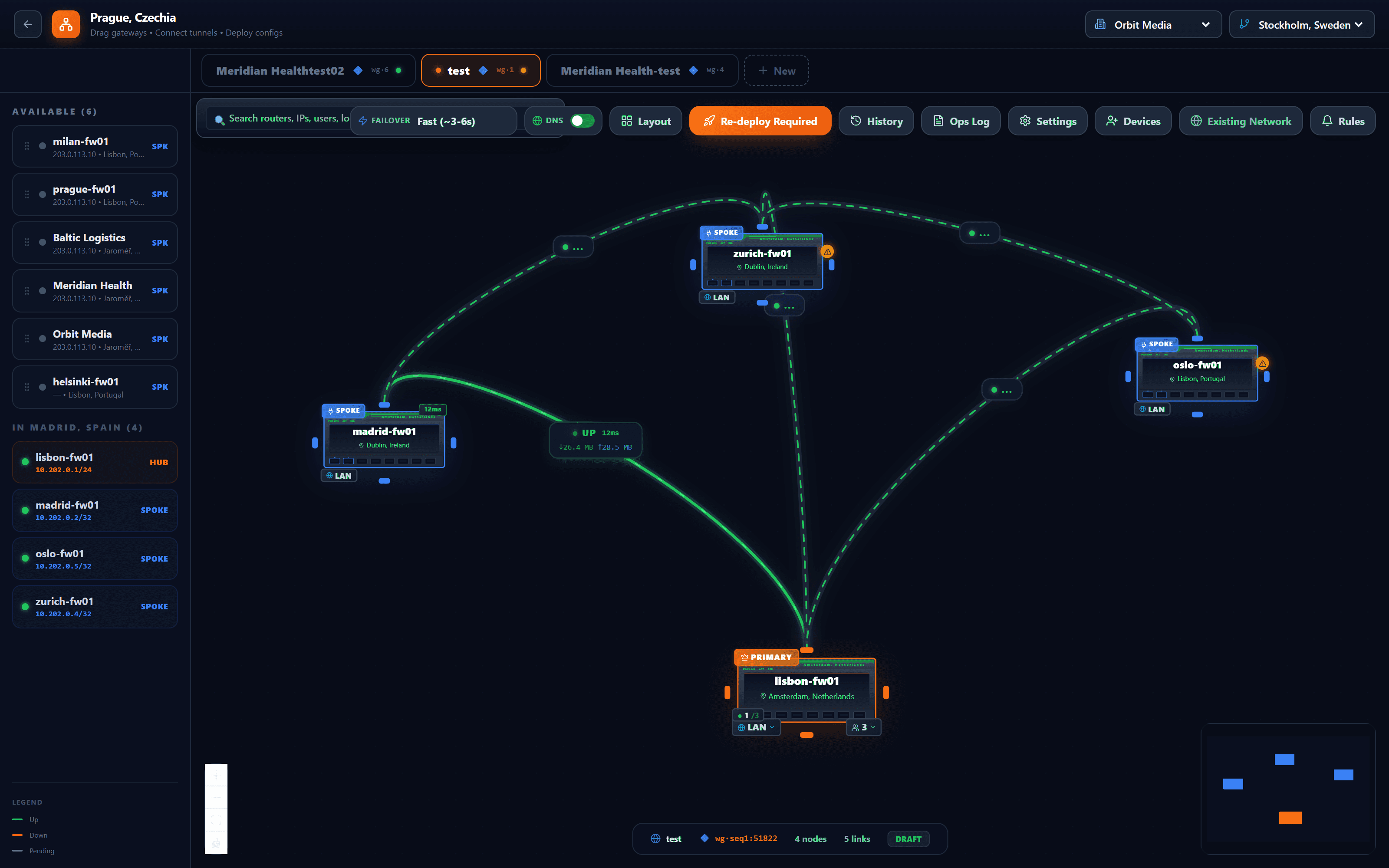
The SASE canvas of the console: gateways listed on the left, spokes and a primary hub placed on a dark map with green tunnels between them, and a toolbar with failover class, layout, history and a re-deploy button.
  1. Gateways, from the fleet

    The firewalls a customer already has, listed by site. Drag one onto the canvas and it becomes a spoke or the hub.

  2. In this shape, one hub terminates every tunnel

    Everything arriving at the primary hub meets the same policy: application control, IDS/IPS, TLS inspection, DLP and the AI gateway. Draw a direct tunnel between two spokes instead and their traffic is inspected at both ends rather than in the middle — the console says so before you commit to it.

  3. Each tunnel reports itself

    Up or down, latency, bytes in each direction — on the link, where you are looking, not in a log you would have to open.

  4. Failover, chosen per topology

    Whether spokes move to a backup hub automatically when the primary stops answering — and after how long a silence — is a setting of the drawing, not of each firewall.

  5. Change the drawing, then deploy

    The canvas knows when it differs from what the firewalls run. One button writes the configuration for both ends of every tunnel and pushes it.

Nobody opens a firewall and types a rule. Both ends of every tunnel are written by the console and pushed.console.zedmos.com · SASE Network

Tunnel transport

Chosen once for the topology.

WireGuard
Recommended
OpenVPN
Remote devices supported
GRE
Site to site only

People, not just sites

Remote users are added the same way, with a one-time enrolment link. Access is per device, so a lost laptop is revoked on its own.

Keeping the fleet current

Zedmos publishes the releases. You decide which firewalls take them and when.

  1. Zedmos

    We publish a release

    For the console and for the firewall, on their own schedules. The console tells you one is available rather than waiting for you to look.

  2. You

    You choose who takes it

    A few firewalls first, then the rest — or the whole estate at once. Upgrading a small group before the others is what finds a problem while it is still small.

  3. You

    You can see what is running where

    The version of every firewall, in one list. A device that fell behind fell behind for a reason, and it is missing every fix since.

How a site and a person get connected

Four steps, and only the first two need anyone. Keys are generated on each device and never travel; the console distributes the public half and nothing else.

  1. You

    Pick a shape, and a hub

    One site becomes the hub — usually the one with a fixed address and the room to inspect. Every other site is a spoke; nothing needs a fixed address but the hub. A second hub, direct tunnels between the spokes that need them, or full mesh are the other three shapes, and each one says on the card what choosing it costs.

  2. You

    Add the sites

    Adding a site to the topology writes the configuration for both ends of the tunnel at once — the spoke and the matching change on the hub — so the two cannot drift apart.

  3. Zedmos

    Spokes dial out

    Each spoke establishes the tunnel outbound to the hub. That is why a branch on a consumer line with a changing address works without anyone opening a port for it.

  4. Zedmos

    People enrol their own devices, against your provider

    A remote person opens a one-time link and, if you require it, signs in at your own OpenID Connect provider first — a token without a multi-factor claim is refused. Their device makes its own key and is granted the named applications their directory groups allow, not a network. A deadline puts them back in front of the provider; losing a laptop revokes that device and leaves their others working.

What the console handles for you

Tunnels the console provisions

Keys, addressing and routes are generated and pushed from one topology view, in the shape you pick: one hub, a hub pair, direct tunnels between the spokes that need them, or full mesh up to eight sites. Adding a site is placing a node, not hand-editing configuration on two firewalls. Where both ends of a pair sit behind a NAT that rewrites ports, a relay in the console's own stack carries the packets without ever holding a key.

A second hub, and a way to reach it

Deploy a backup hub and the console can move the spokes to it when the primary stops answering. Switching is opt-in and takes a few minutes, because it waits out a silence threshold and then confirms with a health check rather than reacting to one missed packet. You can also trigger it yourself, with a preview of what will change.

Remote people, bound to your own directory

A one-time enrolment link generates the keypair on the person's own device — the private key is never seen by the console — and enrolment can require a sign-in at your own OpenID Connect provider first, refusing a token that carries no multi-factor claim. What the person then reaches is a list of named applications and their ports, not a network. A deadline puts the device back in front of the provider, and device health comes from the Intune or CrowdStrike you already run.

Questions and answers

What does Zedmos SASE consist of?

An overlay over WireGuard, OpenVPN or GRE provisioned from the console, in the shape the estate needs — hub-and-spoke, dual hub, spoke shortcuts or full mesh — with an optional backup hub and automatic failover, and a relay for pairs behind port-rewriting NAT. Remote people connect with a standard WireGuard client, bound at enrolment to your own provider, and everything they send is inspected at the hub: application control, IDS/IPS, TLS inspection, DLP and the AI gateway.

Does Zedmos SASE route my traffic through a vendor cloud?

No. The hubs are your own firewalls, on your hardware or on ZedmOS, and inspection happens on the hub you run. Nothing passes through Zedmos.

Do remote users need a Zedmos client?

No. Remote users connect with a standard WireGuard client. A one-time enrolment link generates the keypair on the user's own device and sends only the public half; the private key is never seen by the console. There is no per-seat client licence.

What happens when a hub fails?

With a backup hub deployed, the console moves every spoke to it once the primary has stopped answering: it waits out a silence threshold, confirms with a health check, and then swaps. Automatic failover is opt-in; you can also trigger it yourself with a preview of what will change. The spokes are moved back once the preferred hub has been stable.

Which tunnel transports are supported?

WireGuard for most deployments, OpenVPN where a certificate-based estate is already the standard, and GRE where the transport is already private and you want routing without a second layer of encryption. All three are built into the engine.

How is a remote user's identity applied to policy?

Users and groups come from Active Directory, Azure AD or SCIM, and policy selects on them by name. A remote tunnel user is identified from the moment they connect, because their address is issued at enrolment.